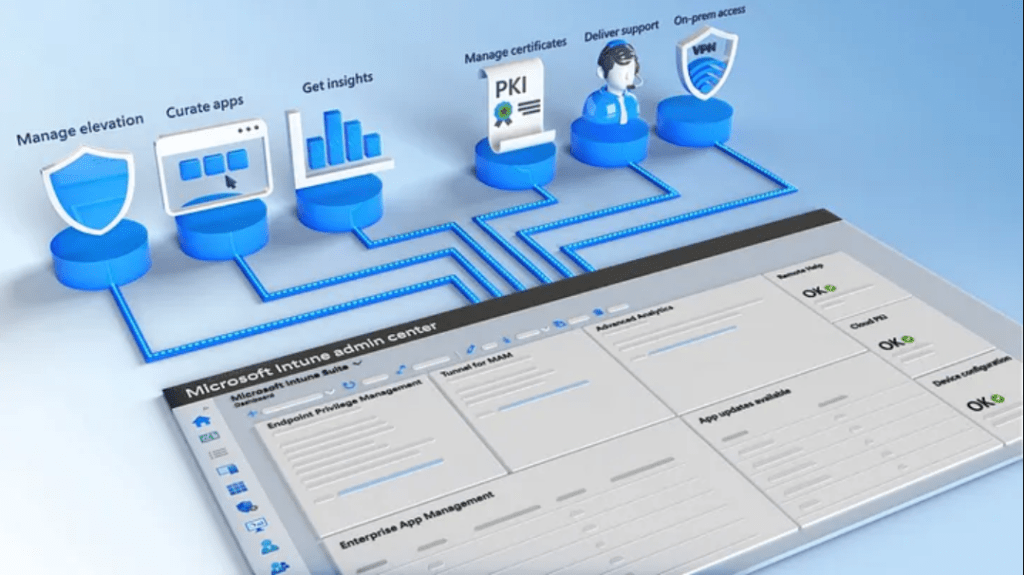
The ‘Microsoft Intune Suite’ plan is a comprehensive set of enhanced features available separately to the standard Intune Plan 1 and Plan 2 offerings and includes features such as remote assistance, application management and cloud PKI.
Although an additional cost, the features enable further vendor consolidation opportunities, streamlined integration and management, and improvements to existing Intune capabilities. These features are not required by all organisations, but add benefit and value to those that do require these kinds of capabilities.
Features included with the Intune Suite Plan are –
| Feature | Description |
| Microsoft Intune Tunnel for Mobile Application Management (MAM) | A VPN solution for iOS and Android mobile devices to enable secure connectivity to on-premises or cloud resources. This capability spans both managed and unmanaged devices, supporting secure BYOD scenarios. |
| Microsoft Intune management of specialty devices | Extension of Intune Device management, configuration and protection capabilities for special, purpose-built devices such as augmented reality, virtual reality headsets, and Teams devices. |
| Microsoft Intune firmware-over-the-air (FOTA) updates | Enables remote and automated firmware updates on supported FOTA devices. |
| Microsoft Intune Remote Help | Secure remote assistance of Windows 10/11, MacOS and specific Android devices. Convenience features such as chat functionality and laser pointing as well as security features including RBAC and device compliance checks. |
| Microsoft Intune Endpoint Privilege Management | Enables elevation rules for standard users on a per application basis, with the ability for administrator approval requirements, or pre-approval. Removes the need to provide local admin credentials via LAPS or other means where this would otherwise be required granting unnecessary administrative control, or additional manual IT administrative assistance. |
| Microsoft Intune Advanced Analytics | Builds upon Endpoint Analytics with enhanced features such as anomaly detection, risk scoring and remote KQL querying. For example, operational analysis of running processes and services executed in near real-time. |
| Microsoft Intune Enterprise Application Management | Simplifies the application deployment and management process by providing applications from a comprehensive application catalogue. This removes the requirement for manually packaging, adding parameters and detection rules for Win32 apps. Crucially, this feature enables continued application update management with supersedence to ensure applications are kept up to date and in a well-managed state. |
| Microsoft Cloud PKI | A public key infrastructure (PKI) solution that enables the simplified and efficient creation of Root and Issuing CA’s without on-premises instances and the complexities and considerations that accompany that. Simplified deployment and management of certificates to Intune enrolled devices as required for security purposes such as network certificate based authentication. |
Note – the following features above are available with Intune P2 –
- Microsoft Intune Tunnel for Mobile Application Management (MAM)
- Microsoft Intune management of specialty devices
- Microsoft Intune firmware-over-the-air (FOTA) updates
If the full Intune Suite plan is not required, or the price point is not justifiable, there are separate add-on license options available. The following features are currently available individually as add-ons –
- Microsoft Intune Remote Help
- Microsoft Intune Endpoint Privilege Management
- Microsoft Intune Advanced Analytics
- Microsoft Intune Enterprise Application Management
- Microsoft Cloud PKI (available soon)
More information on the Intune suite is available here – https://aka.ms/IntuneSuite
 365Pete.blog