
As the world gets to grips with the adoption and understanding of AI assistant technologies, from a business perspective, the practicalities and risks also need consideration, with an appropriate strategy in place. Some of the key questions include –
- Is sensitive data being presented in AI responses? If so, how can we control this?
- Are employees using AI assistants responsibly within the workplace?
- Which AI assistants are employees using and favouring?
- Are employees potentially oversharing sensitive information?
- Is there a means of monitoring AI usage within the organisation?
This post explores Microsoft Purview’s Data Security Posture Management (DSPM) for AI capabilities. Whilst it’s a Microsoft solution, it doesn’t just apply to Copilot. DSPM supports a wide range of generative AI tools, including ChatGPT, Google Gemini, and others. A complete list can be found here – Supported AI sites by Microsoft Purview for data security and compliance protections | Microsoft Learn
DSPM for AI is a premium Purview feature, and the M365 E5 license provides substantial capabilities. To enable all recommendations, an Azure subscription will also be required.
In a nutshell, the DSPM for AI capabilities allow you to configure a range of policies and reports, including –
Policies
- Blocking elevated risk users from pasting or uploading sensitive info on AI sites
- Blocking elevated risk users from submitting prompts to AI apps in Microsoft Edge
- Blocking sensitive info from being sent to AI apps in Edge
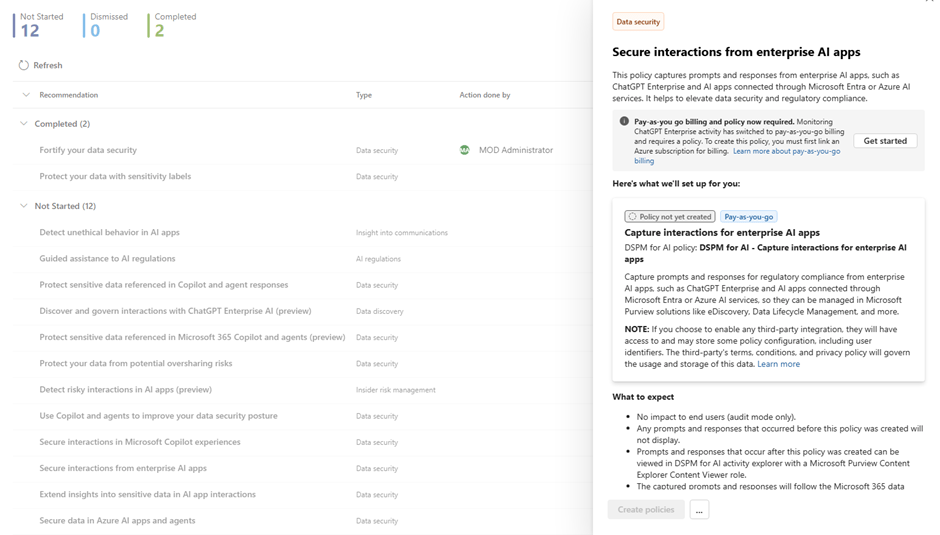
- Detecting unethical behaviour in Microsoft 365 Copilot and agents
- Detecting sensitive information shared in AI prompts in Edge
- Detecting when users visit AI sites
- Detecting when sensitive information is pasted or uploaded to AI sites
Reports
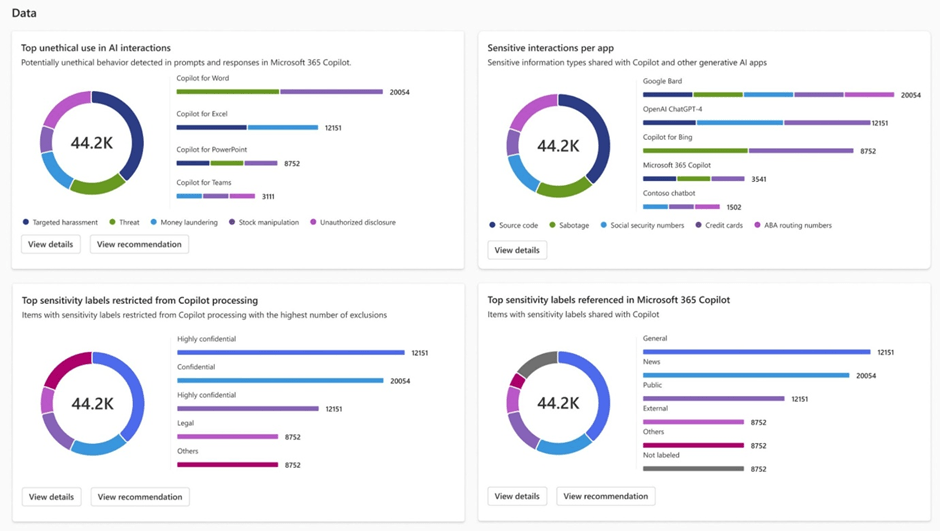
- Reporting on total interactions over time
- Total number of visits to AI sites
- Sensitivity labels referenced in copilot agents
- Potentially risky AI usage
- Insider Risk association
Initial configuration
Set up of the capabilities is straightforward and includes a guided ‘Get started’ approach to understand and track initial configuration tasks.
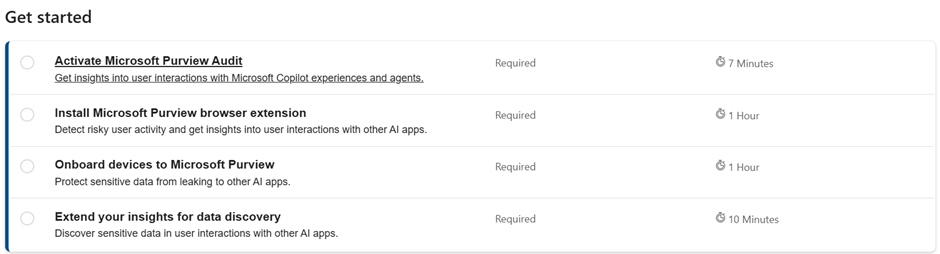
The ‘Activate Microsoft Purview Audit’ task is simple and is a 1 click selection to enable it, with up to 24 hours for full enablement.
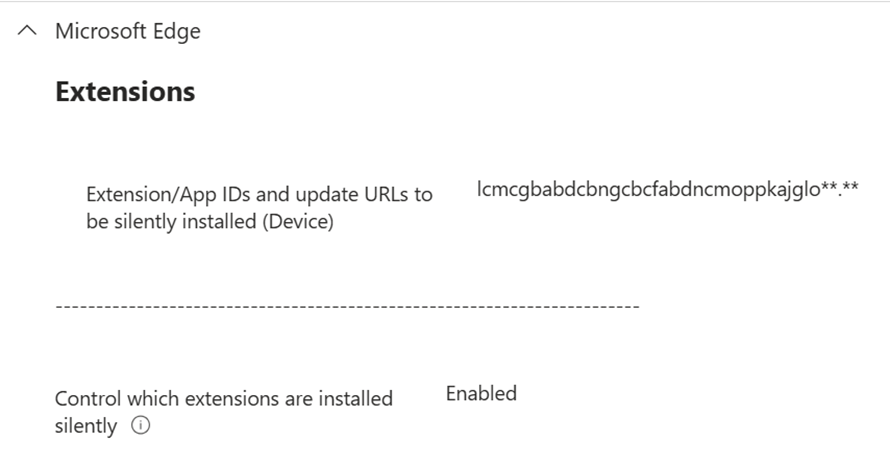
The ‘Install Microsoft Purview browser extension’ task requires effort to configure the extension on end user devices. Assuming the use of Intune, this is easily configurable within a Configuration Profile, which can initially be isolated to a pilot group/device for testing. Alternatively, this can be manually configured within the browser, or via GPO within Active Directory.
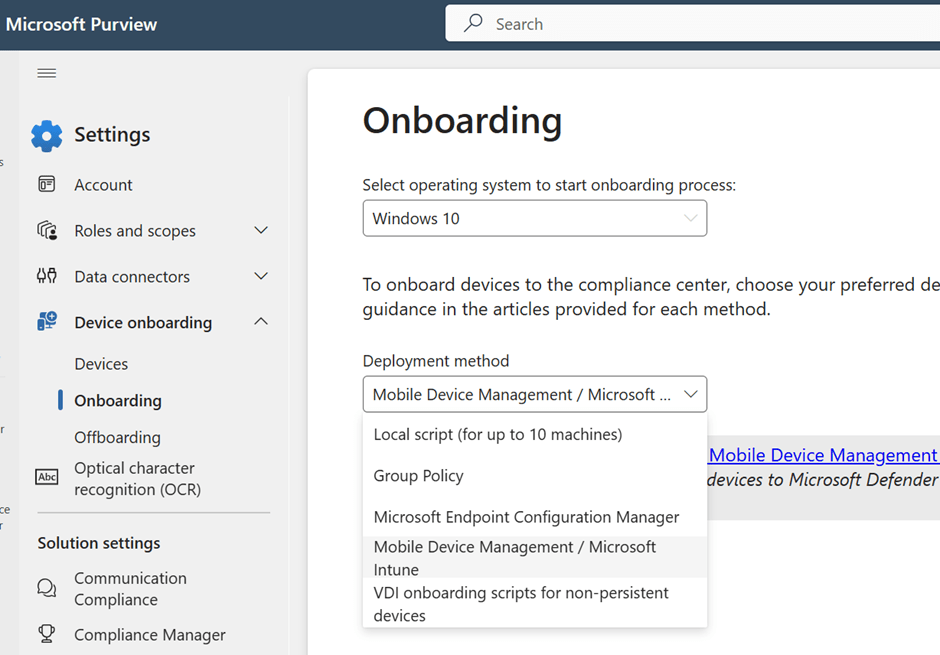
The ‘Onboard devices to Microsoft Purview’ task is achievable with a variety of methods, and for those already onboarded to Defender for Endpoint, no additional configuration is required. The available onboarding methods are available from within the Purview settings > Devices > onboarding
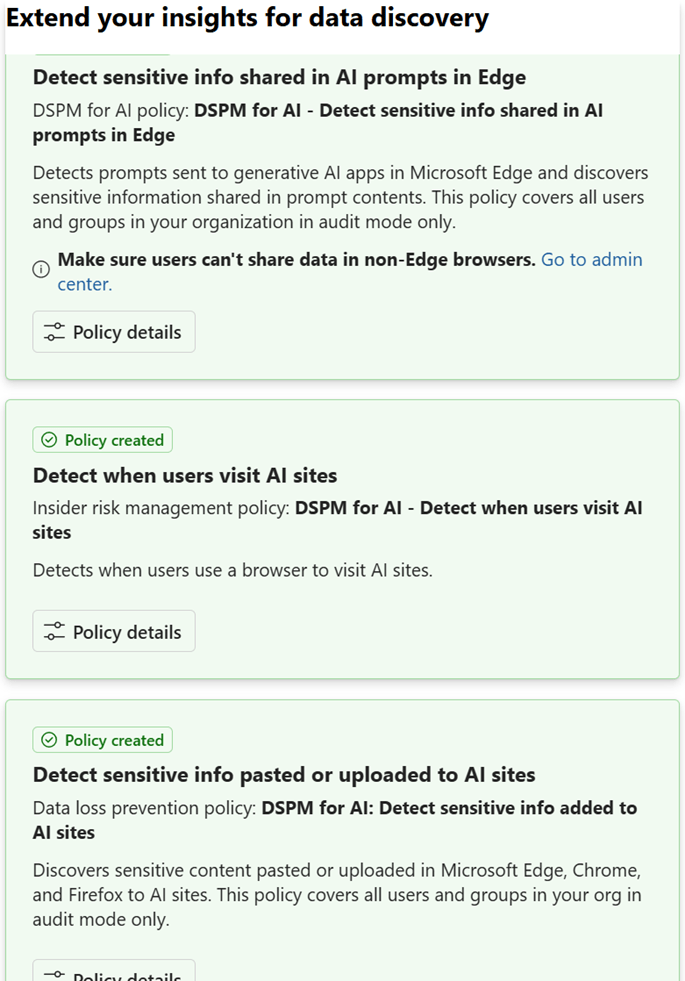
The ‘Extend your insights for data discovery’ task includes the creation of 3 core policies, and these are created simply with the click of a button. This task can also take up to 24 hours to be fully enabled.
Beyond the initial ‘Get started’ tasks, there are number of recommendations to review and implement where appropriate. Some of these recommendations include configuration that crosses over into other areas, for example the ‘Detect unethical behaviour in AI apps’ policy requires a PAYG Azure subscription for the purposes of premium Azure services like advanced logging, storage and analytics costs.
After initial setup, the Reports area starts populating with actionable insights. Familiar dashboards from other areas of Purview and M365 make it recognisable and simple to navigate.
Summary
The DSPM for AI capabilities within Purview ensure that AI assistant usage is both manageable and reportable, supporting an AI, and wider data governance and compliance strategy.
For Copilot specifically, for data to be searchable it needs to reside within connected services. This means data being hosted in SharePoint and OneDrive, prompting questions including –
- Is this data sufficiently protected or classified?
- Should this data be searchable by Copilot?
- Is now an opportunity to introduce additional measures like DLP or Information Protection, if not already inherited?
- What sharing policies are in place on the tenant and how will they impact this data?
Beyond AI-specific considerations, governance and compliance features such as Data Loss Prevention (DLP), Microsoft Purview Information Protection (MPIP), Insider Risk Management and defining organisational sensitive information types should all be considered and are key to a successful data governance and compliance strategy.
 365Pete.blog