
Is your organisation at risk from unmanaged Microsoft 365 Copilot (and other products) access with user-controlled self-service trials and purchases?
Microsoft 365 Copilot offers powerful AI-driven productivity enhancements, but if it’s adopted through self-service trials and purchases, it can expose your organisation to unapproved spend, data governance gaps, and compliance risks with potentially hefty consequences.
The ‘self-service trials and purchases’ capability within M365 provides users with access to trial and/or purchase products associated directly with the tenant, and not their own, unrelated, personal subscriptions. This is enabled by default on tenants.
In short, this default configuration enables users to trial and purchase products with their own payment method, and importantly, this is still associated with the tenant and not a personal Microsoft account.
To disable this option for Copilot or another product specifically –
- Sign in to the tenant with administrative credentials at https://admin.microsoft.com
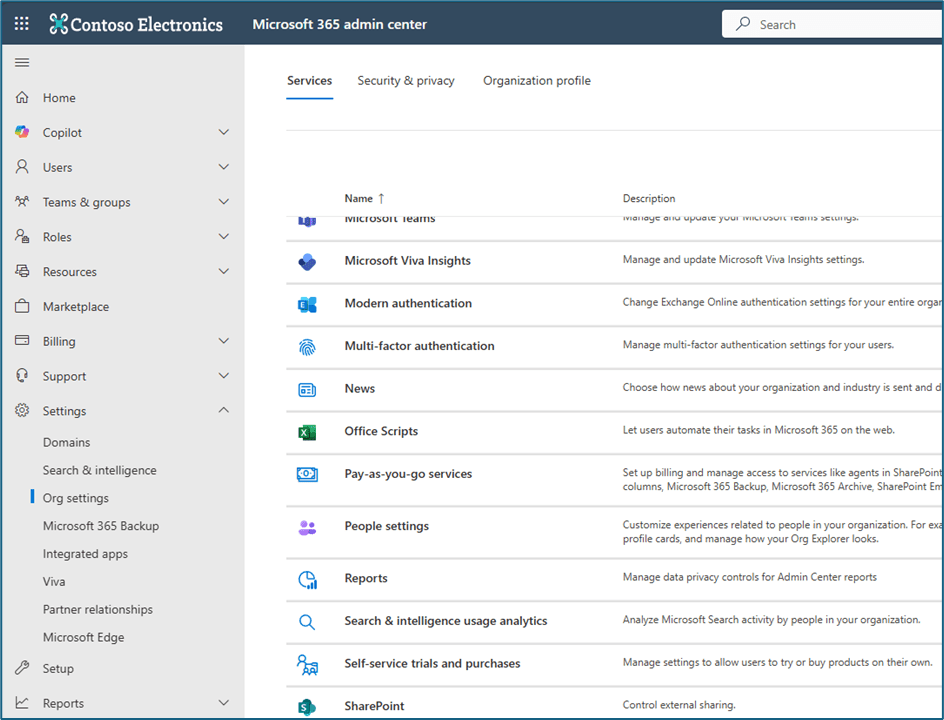
- Navigate to ‘Org settings’ and select ‘self-service trials and purchases’
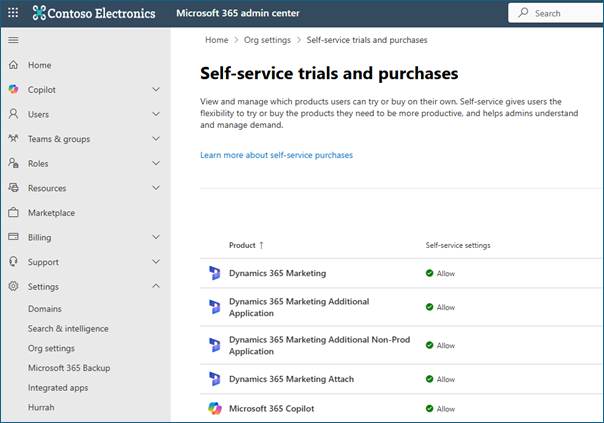
- Find and select the product from the list (in this case Microsoft 365 Copilot).
- When selected, the options presented are –
- Allow
- Allow trials only
- Do not allow
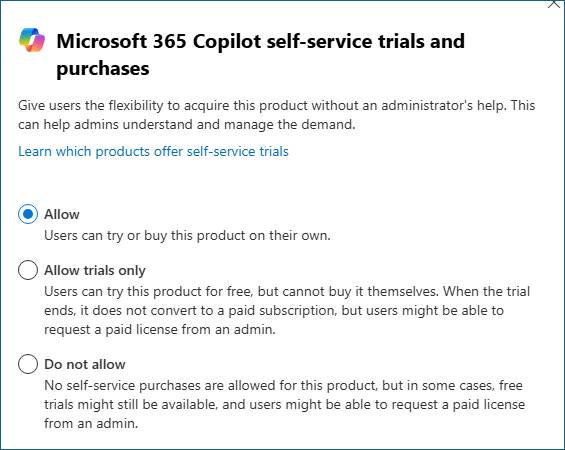
- Select ‘Do not allow’ to disable this option and save to apply changes.
To disable all self-service trials and purchases, this can be done via PowerShell as follows –
- Install the module with the following PowerShell cmdlet – Install-Module -Name MSCommerce
- Connect to the MS Commerce module – Connect-MSCommerce

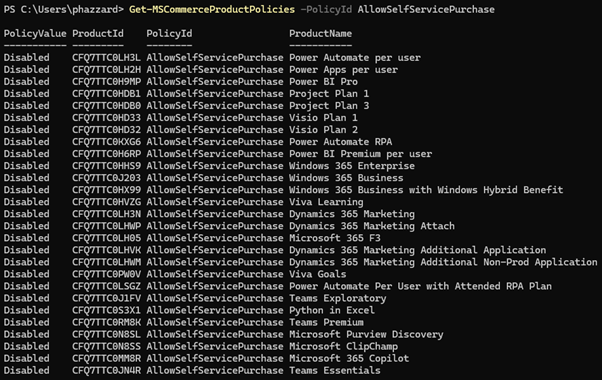
- Run the following cmdlet to view current settings for all products – Get-MSCommerceProductPolicies -PolicyId AllowSelfServicePurchase
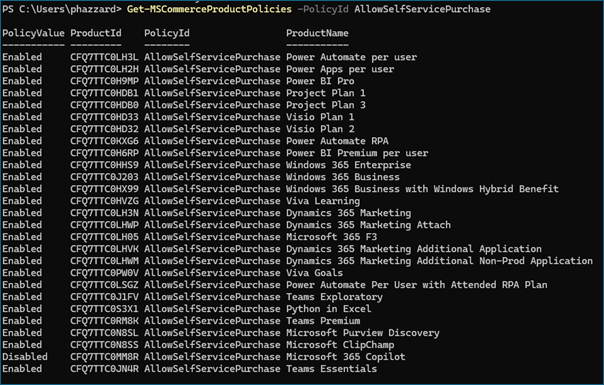
Note – in this instance, having disabled ‘Microsoft 365 Copilot’ explicitly using the portal GUI method, it’s already disabled.
- To disable self service trials and purchases for ALL listed products, use the following cmdlet –
Get-MSCommerceProductPolicies -PolicyId AllowSelfServicePurchase | ForEach-Object {
Update-MSCommerceProductPolicy -PolicyId AllowSelfServicePurchase -ProductId $_.ProductId -Enabled $false
}
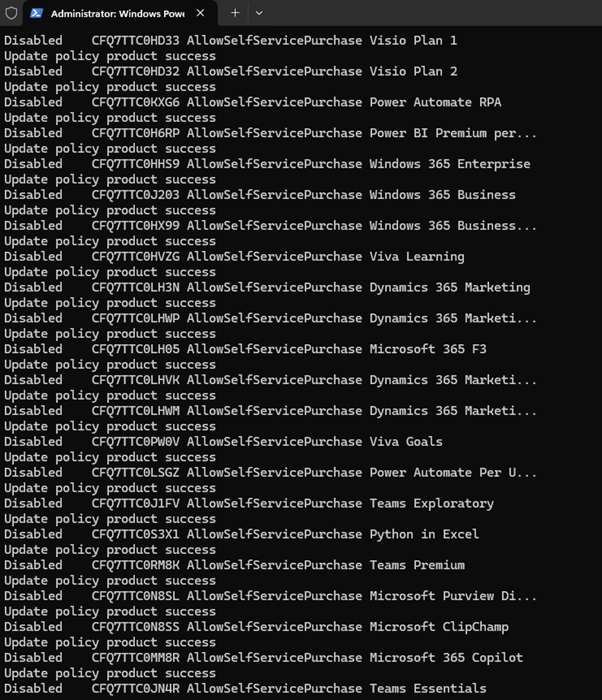
- Validate success by repeating the get command – Get-MSCommerceProductPolicies -PolicyId AllowSelfServicePurchase
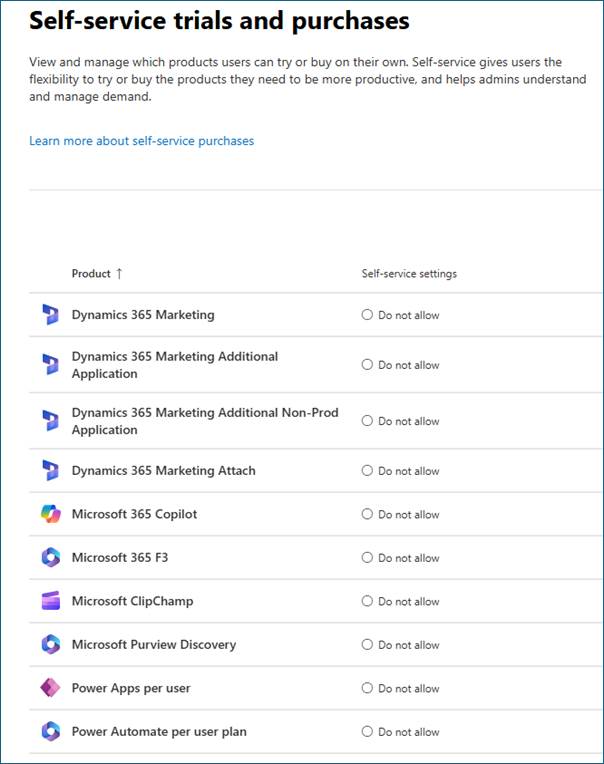
For completeness, the portal is now updated to ‘Do not allow’ as a result of the PowerShell action –
Risks of leaving the self-service trials and purchases for users option enabled on the tenant
The following list are some examples of the risks associated with enabling self-service trials and purchases –
- Unapproved spending – users can purchase subscriptions with their own payment methods that are then shown and reported on under the tenant.
- When users start a self-service trial, data may be stored in unmanaged environments outside of your organisation’s compliance boundaries.
- Purchases are associated with the tenant directory, but billing and control remains associated with the user who purchased them.
- Administrators aren’t notified when a user starts a trial or buys a product.
- Microsoft support will expect the purchasing user (not your admin team) to manage their subscription.
- Users may accept Microsoft terms not approved by your legal or procurement teams.
Key differences between Copilot and M365 Copilot
| Feature | Microsoft Copilot (Free) | Microsoft 365 Copilot |
| Data sources | Public web only | Tenant M365 data (OneDrive, SharePoint, Exchange etc.) |
| Application integration | Browser/chat only | Deep integration with the Office productivity suite |
| Security and compliance | Consumer applied | Inherits organisational security and compliance settings (if configured) |
| Context awareness | None | Organisational context via Graph |
Also see my blog post related to ‘Data Security Posture Management (DSPM) for AI’ here –https://365pete.blog/2025/07/04/managing-ai-data-risk-with-microsoft-purview/
 365Pete.blog